School bells, PA and emergency alerts. In one device.

SICO Bell connects to the speakers you already have and runs the day: bells on a timetable, music in the breaks, live announcements from a phone and Israel Home Front Command alerts. Control it from the app, a computer or the browser.

  1. First bell

    The timetable rings every speaker on its own, on time.

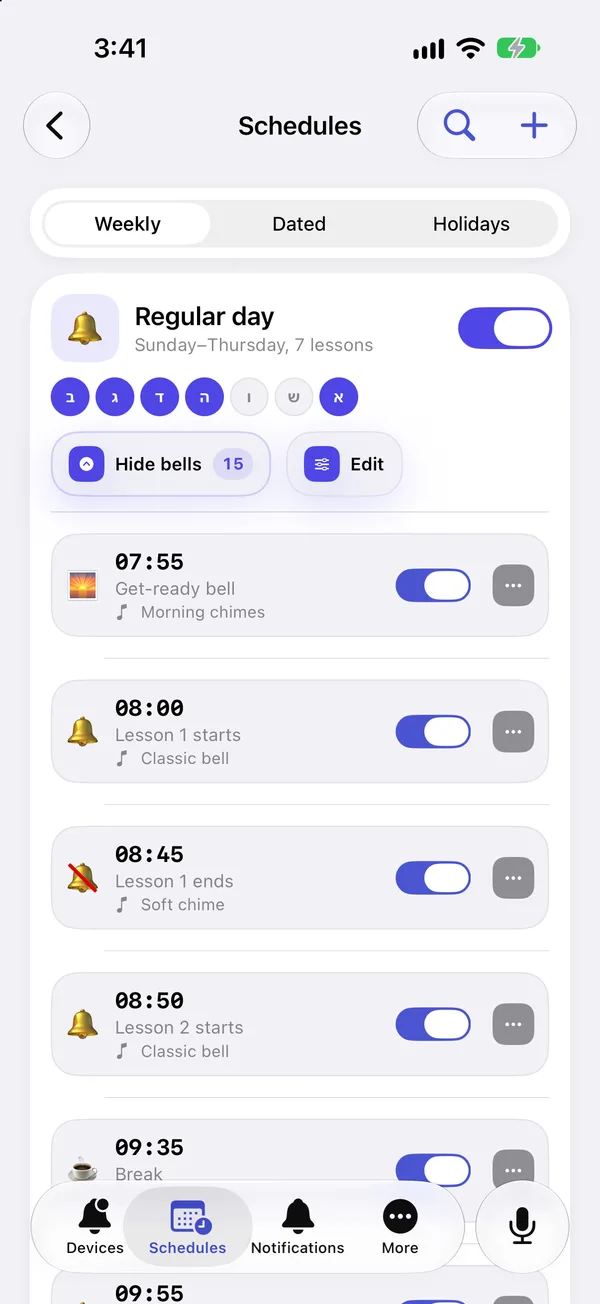
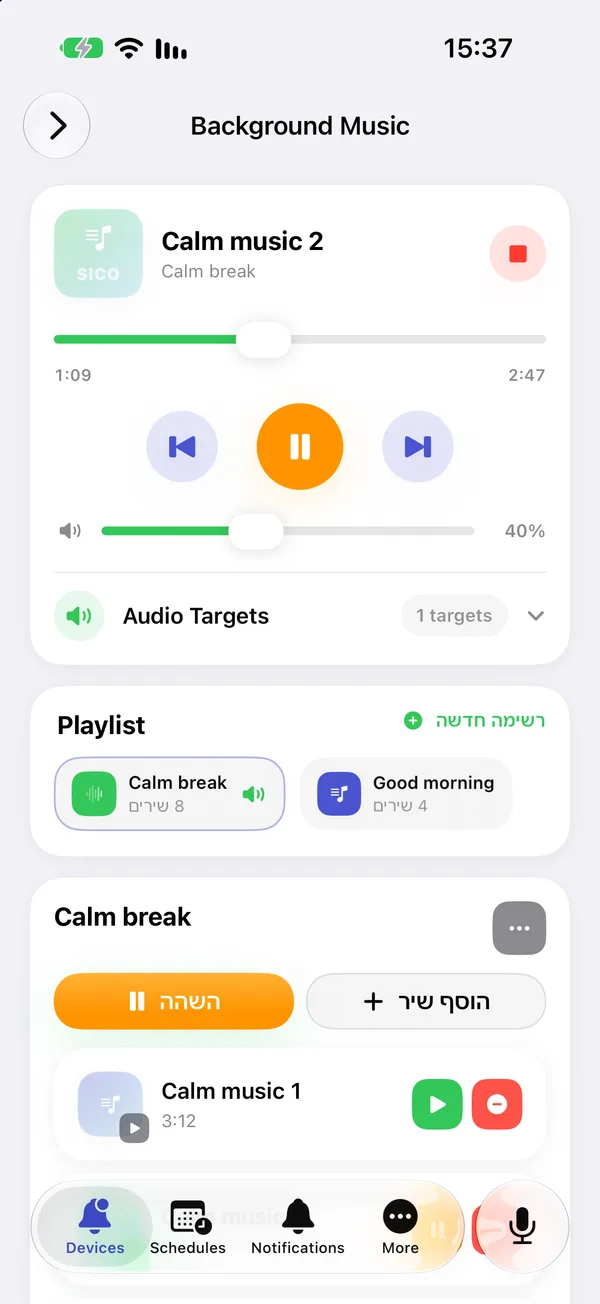
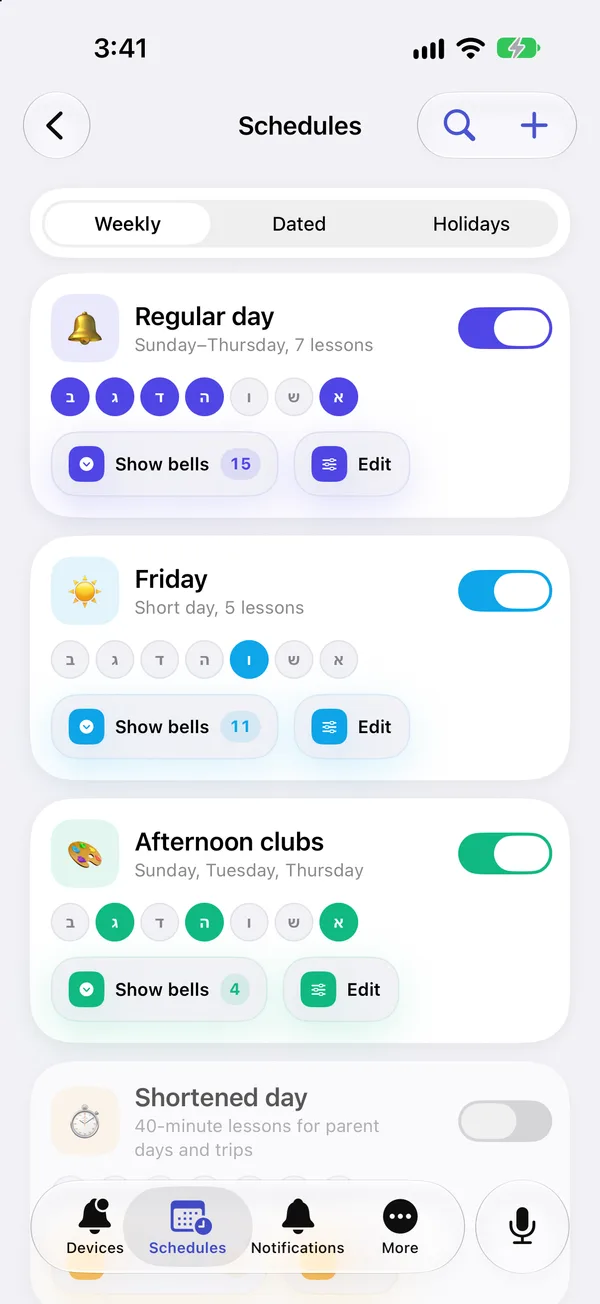
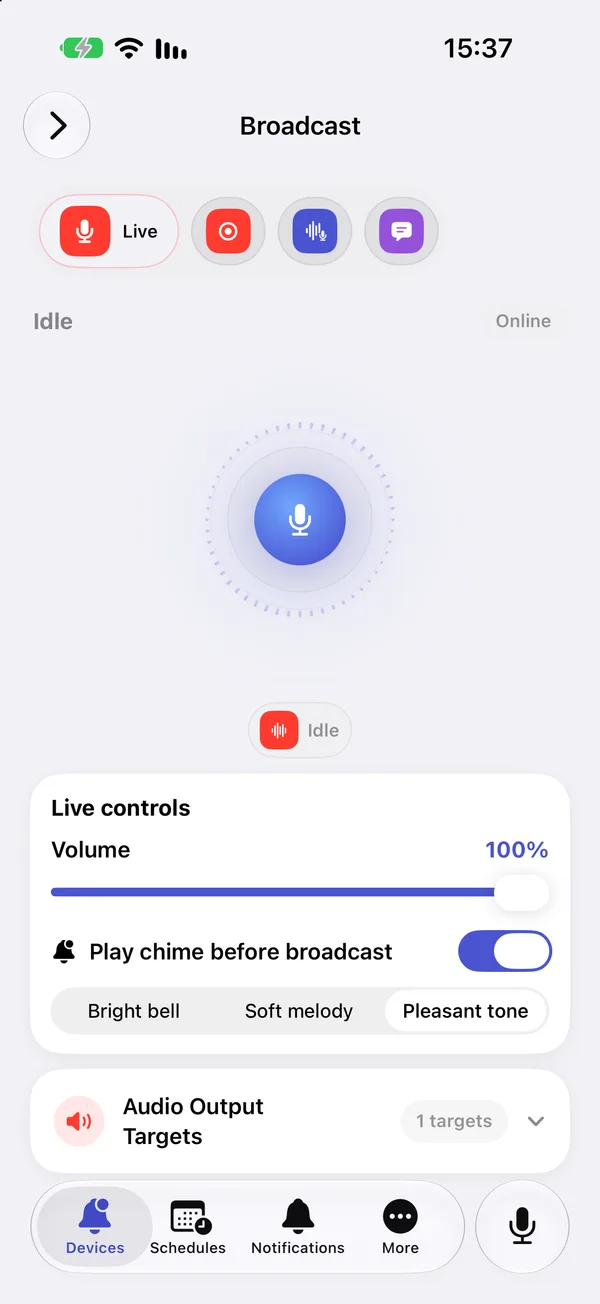
The day’s bells in the iPhone appBackground music player in the iPhone appTimetables in the iPhone appBroadcast screen in the iPhone appTimetables in the iPhone appThe day’s bells in the iPhone appThe day’s bells in the iPhone app

Bells and timetables

Build the timetable once and the device rings on its own. The timetable is stored on the device itself, so bells keep going even without internet.

In every plan, Free included. The sound library and editor come with Basic.

  • Several timetables at once Morning, afternoon and Friday timetables, each with its own name, colour and days.
  • Holidays and exceptions A day with no bells, a holiday date range, or a different timetable for a special day.
  • One-off events A bell or a message at a set date and time, for a ceremony or a sports day.
  • Bells your way A sound file per bell, number of repeats, the gap between them and which speakers play it.
  • Sound library and editor Upload MP3, WAV, OGG, AAC, M4A or FLAC, then trim or fade it right in the app.
  • Calendar and countdown Month and year views, and the time to the next bell on every screen.
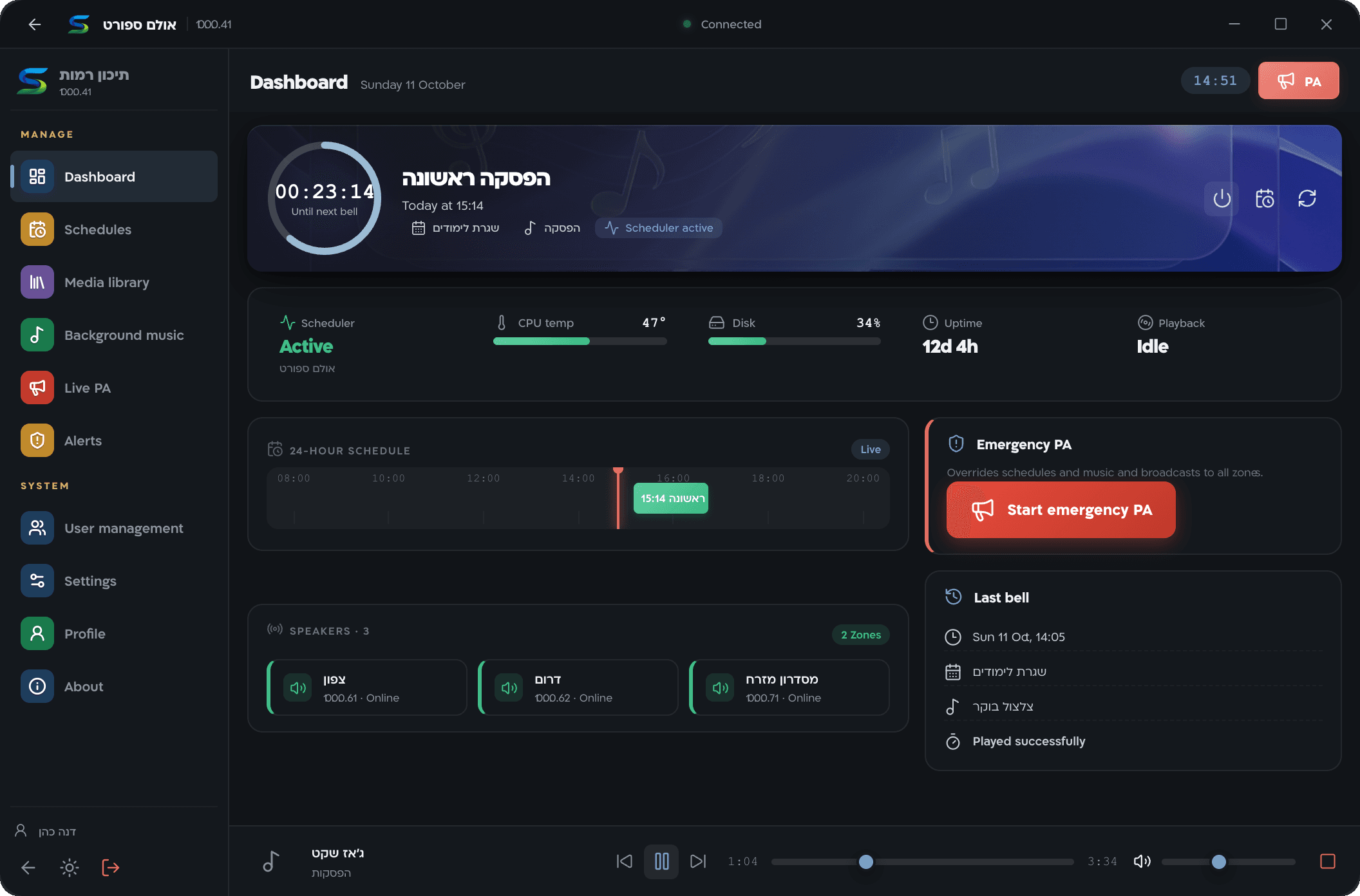
Windows app dashboard: countdown to the next bell, device status and speakers

Announcements

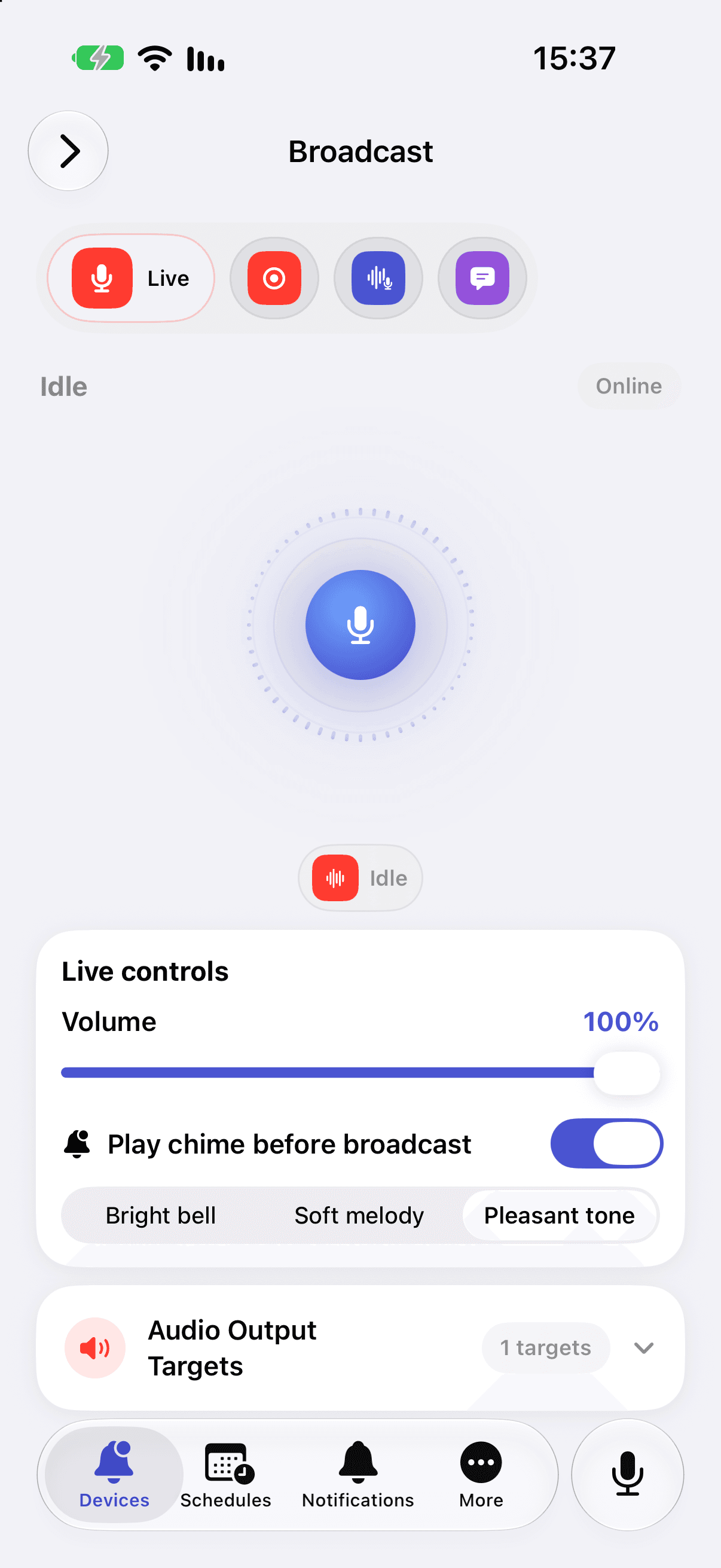
Talk to the whole school from a phone, a computer or the browser. An announcement cuts in over music and bells, and starts with a chime so people listen.

Text to speech comes with Basic. Live and recorded announcements, phone calls and WhatsApp come with Pro.

  • One-tap announcements A fixed PA button in the app: tap to start, tap again to finish.
  • Recorded messages Record once, keep it in the library and play it whenever you need.
  • Text to speech Type a message and pick a voice: Hebrew, English, Arabic or Russian, in a neutral, urgent, friendly or formal tone.
  • Announce from a phone call Call the system’s number from an approved phone, pick a device, and talk live or record a message.
  • WhatsApp voice notes Send a voice note, confirm, and it plays on the speakers. You can also ask for device status or change a timetable in a text message.
  • From a desk phone Phones on your PBX can dial the device and page directly, no app needed.
Broadcast screen in the iPhone app: talk button, volume and opening chime

Music in the breaks

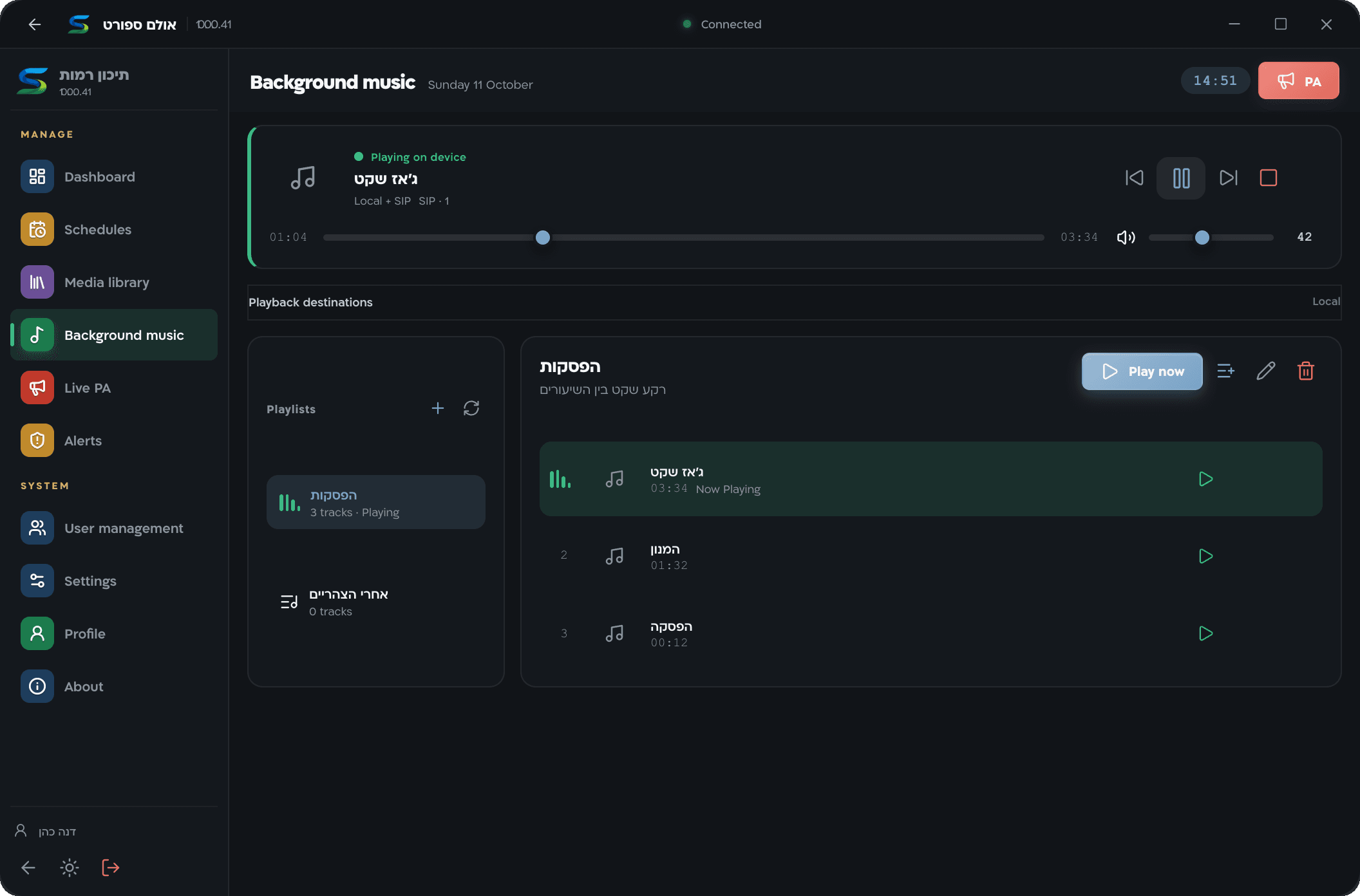
Playlists that play in the background at the hours you choose. When a bell, an announcement or an alert comes, the music steps aside and returns from the same spot.

From the Basic plan.

  • Playlists Build playlists from the library and control the player from any device.
  • By date and hours Music on the day and within the hours you set, with its own volume and speakers.
  • Pauses by itself Bells, announcements and alerts always come first. When they end, the song carries on from where it stopped.
Background music in the Windows app: player and playlists

Home Front Command alerts on the school speakers

The device itself checks the Israel Home Front Command (Pikud HaOref) feed every two seconds. When there is an alert for your locality, it cuts off any bell, music or announcement and plays a siren and the type of threat.

What the speakers play
  1. Siren
  2. Rocket and missile fire
  3. Siren

× Three times, or as many as you set (1 to 10)

1,449 localities to choose from
Pick the school’s locality, or several.
6 threat types
Missiles, hostile aircraft, terrorist infiltration, earthquake, tsunami and hazardous materials. Drills if you want them.
2 seconds between checks
Straight from the Home Front Command to the device, not through our server.
  • Early warning and end of event The official early warning plays with a chime and an announcement. The end of an event is announced only when the Home Front Command declares it.
  • Terrorist infiltration Lockdown tones and an announcement instead of the usual siren.
  • Everyone on staff is told Every user in the organisation gets a phone notification. If the device couldn’t play the alert, a separate notification goes out.
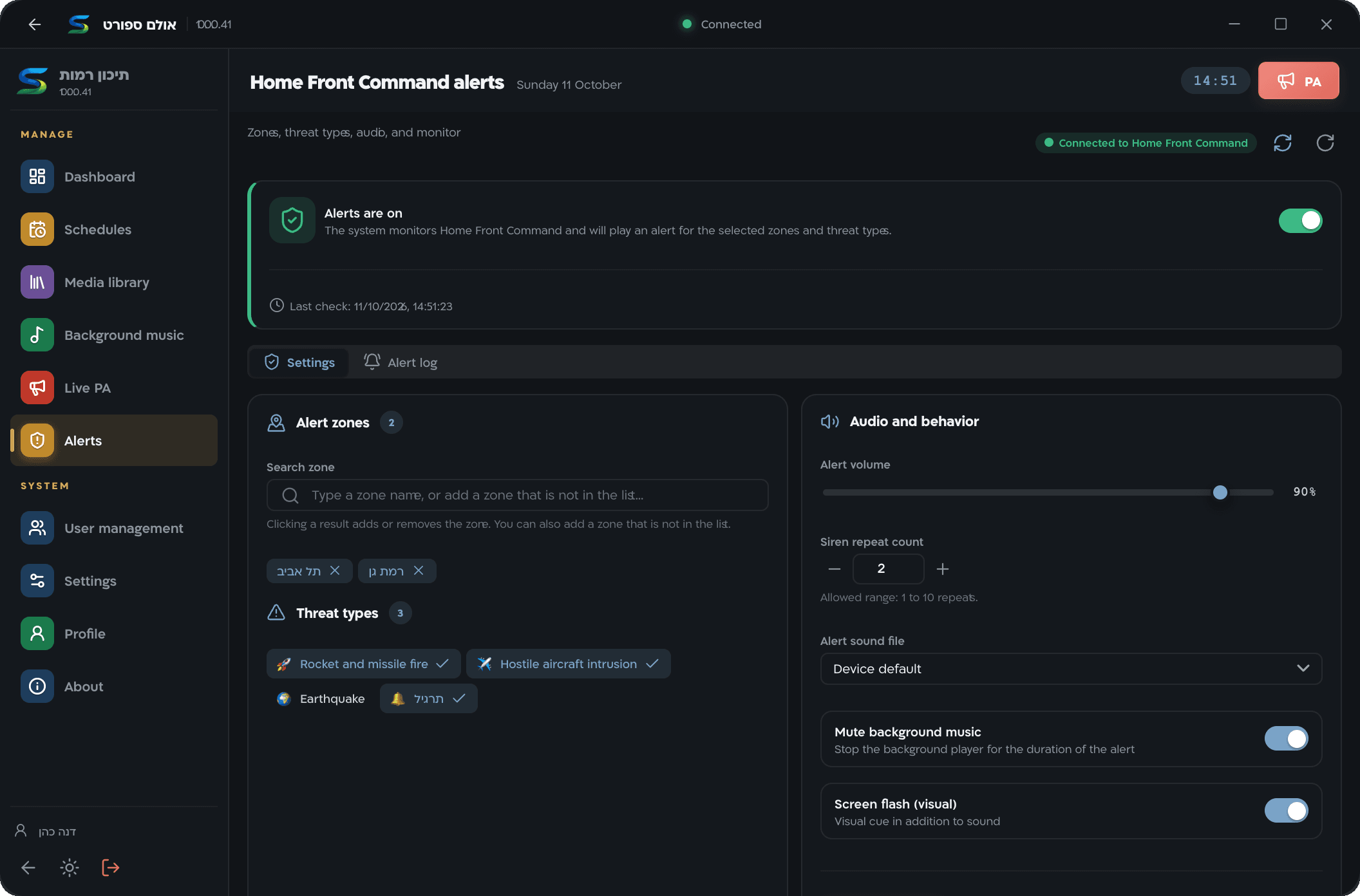
Home Front Command alert settings in the Windows app: localities, threat types and volume

Alerts come with the Basic plan. They stay off until you choose localities and turn them on, in the device settings in the app.

SICO Bell plays the official Home Front Command alerts on your speakers. It is not a certified voice-alarm or evacuation system and does not replace the Home Front Command app, public sirens or official instructions. Alerts reach the device over the school’s internet connection.

Everything about alerts

Works with the speakers you already have

The device connects to the school’s existing amplifier. You can add IP speakers too and split them into zones, and every sound plays on all of them together.

  • Your amplifier An audio output from the device into the PA system that’s already installed.
  • IP speakers (SIP) Add speakers, group them into zones, and test each one with a test call.
  • In sync Bells, announcements and alerts play together on the device and the IP speakers.
Apps and browseriPhone, Windows, browser and extension. Android soon
Phone call and WhatsAppfrom approved numbers
SICO Bell cloud
Home Front Commandstraight to the device
The device at schooltimetables, sounds and music are stored on it
Desk phonethrough your PBX
Your amplifierand the speakers in halls and classrooms
IP speakerssplit into zones

Run several schools with several people

A network, a municipality or a single school: every device in one account, and each person sees and does only what they’re allowed to.

Free: 1 device and 2 users. Basic: 3 devices and 5 users. Pro: 15 devices and 30 users. Device sharing comes with Basic.

  • Per-device permissions View only, control or admin, for each user and each device separately.
  • Sharing Invite someone from another organisation by email to control a specific device.
  • Phone notifications When an alert played, when a device went offline or came back, and when a timetable changed.
  • Software updates Update a device from the app. If it doesn’t come back up properly, it rolls back to the previous version.
  • Backups Backups of settings and sounds, also automatically once a day.
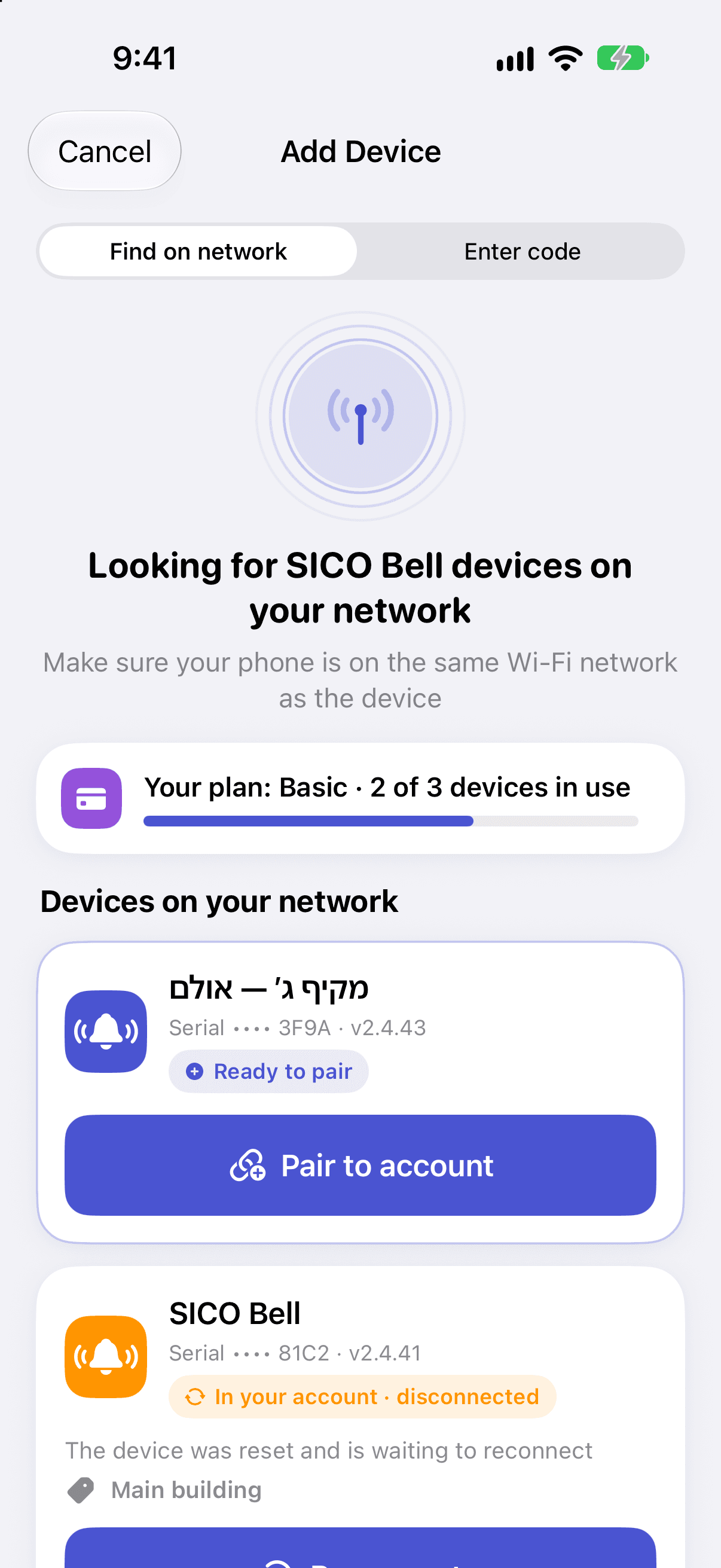
  • Adding a device The app finds the device on your Wi‑Fi, or you enter a 6-digit code.
  • Your logo The school’s logo shows on the device in every app.
  • Easy sign-in With Google, Microsoft or Apple, or with email and password.
Adding a device in the iPhone app: devices found on the Wi‑Fi network

When the internet goes down

The device doesn’t depend on our server to work. Timetables, sounds and music are stored on it, and it reconnects by itself when the network is back.

Keeps working

  • Bells on the timetable
  • Holidays, exceptions and one-off events
  • Scheduled background music
  • Announcements from the Windows app and the extension on the school network
  • Paging from a desk phone on your PBX
  • The device’s own interface on the local network

Back with the connection

  • Home Front Command alerts, which come from the internet straight to the device
  • Control from phones and the browser
  • Text to speech
  • Announcing by phone call and WhatsApp

Pricing

Start free with timetables and upgrade when you need more. Pay on the website, monthly or yearly.

Billing period
  1. Free

    Timetables and bells

    FreeNo time limit

    1 device 2 users

    Start free
    • Timetables, holidays and one-off events
    • Control from the apps and the browser
  2. Basic

    Sounds, music and alerts

    ₪29 / month

    Paid yearly: ₪278 / year

    Up to 3 devices 5 users

    Choose Basic

    Everything in Free, plus:

    • Sound library and editor
    • Background music and playlists
    • Home Front Command alerts
    • Text to speech
    • Device sharing
  3. Best fit for a school

    Pro

    Announce from anywhere

    ₪49 / month

    Paid yearly: ₪470 / year

    Up to 15 devices 30 users

    Choose Pro

    Everything in Basic, plus:

    • Live announcements from phone, computer and browser
    • Announcing by phone call
    • Announcing over WhatsApp
    • Broadcast monitoring

Prices are in Israeli shekels and include VAT.

More than 15 devices, or a network of schools? An organisation plan with everything in Pro and no limit on devices or users, priced for you. Talk to us: 03-5580090

Get started

  • iPhone

    iOS 17 or later

    Download on the App Store
  • Windows

    For the school office computer

    Download for Windows

    Windows 10 or 11, 64-bit

  • Browser

    From any computer, nothing to install

    Open app.sicobell.com
  • Chrome and Edge extension

    Announcements and music from the toolbar

    Download the extension
  • Android

    In testing, coming soon to Google Play

    Soon on Google Play
More about every app

Questions

Do we need to replace the school’s PA system?

No. The device connects to the amplifier you already have and plays bells, music, announcements and alerts through it. If you have IP (SIP) speakers, you can connect them too and split them into zones.

What happens when the internet goes down?

Timetables are stored on the device itself, so bells, holidays, scheduled events and background music carry on as usual. Control from the apps, text to speech and announcing by phone or WhatsApp come back with the connection. The device reconnects by itself.

How do Home Front Command alerts work?

The device itself checks the Israel Home Front Command (Pikud HaOref) feed every two seconds over the school’s internet connection. When there is an alert for a locality you chose, it cuts any other sound, plays a siren and announces the type of threat, and everyone in the organisation gets a phone notification.

Is this a certified emergency voice-alarm system?

No. SICO Bell plays the official Home Front Command alerts on your speakers, but it is not a certified voice-alarm or evacuation system and does not replace the Home Front Command app, public sirens or official instructions.

Which devices can control it?

The iPhone app, the Windows app, the browser at app.sicobell.com and an extension for Chrome and Edge. The Android app is in testing and coming to Google Play soon.

Can we make announcements without the app?

Yes. With Pro, call the system’s number from an approved phone and talk live or record a message, or send a WhatsApp voice note. Desk phones on your PBX can dial the device directly.

How many people can manage the system?

Free has 2 users, Basic 5 and Pro 30. For each user and each device you choose view only, control or admin. From Basic you can also share a device with someone from another organisation.

How much does it cost?

The Free plan covers one device and timetables. Basic is ₪29 a month and Pro ₪49 a month, VAT included, with 20% off when paid yearly. Networks with more than 15 devices get an organisation plan priced for them.

Which languages does it support?

Every app is in Hebrew and English. Text to speech is available in Hebrew, English, Arabic and Russian.

Talk to us

Questions, a demo, installation or a quote for a network of schools. SICO Bell is developed and run by Shia Migun.